Marketing Strategy Emily Wyatt Marketing Strategy Emily Wyatt

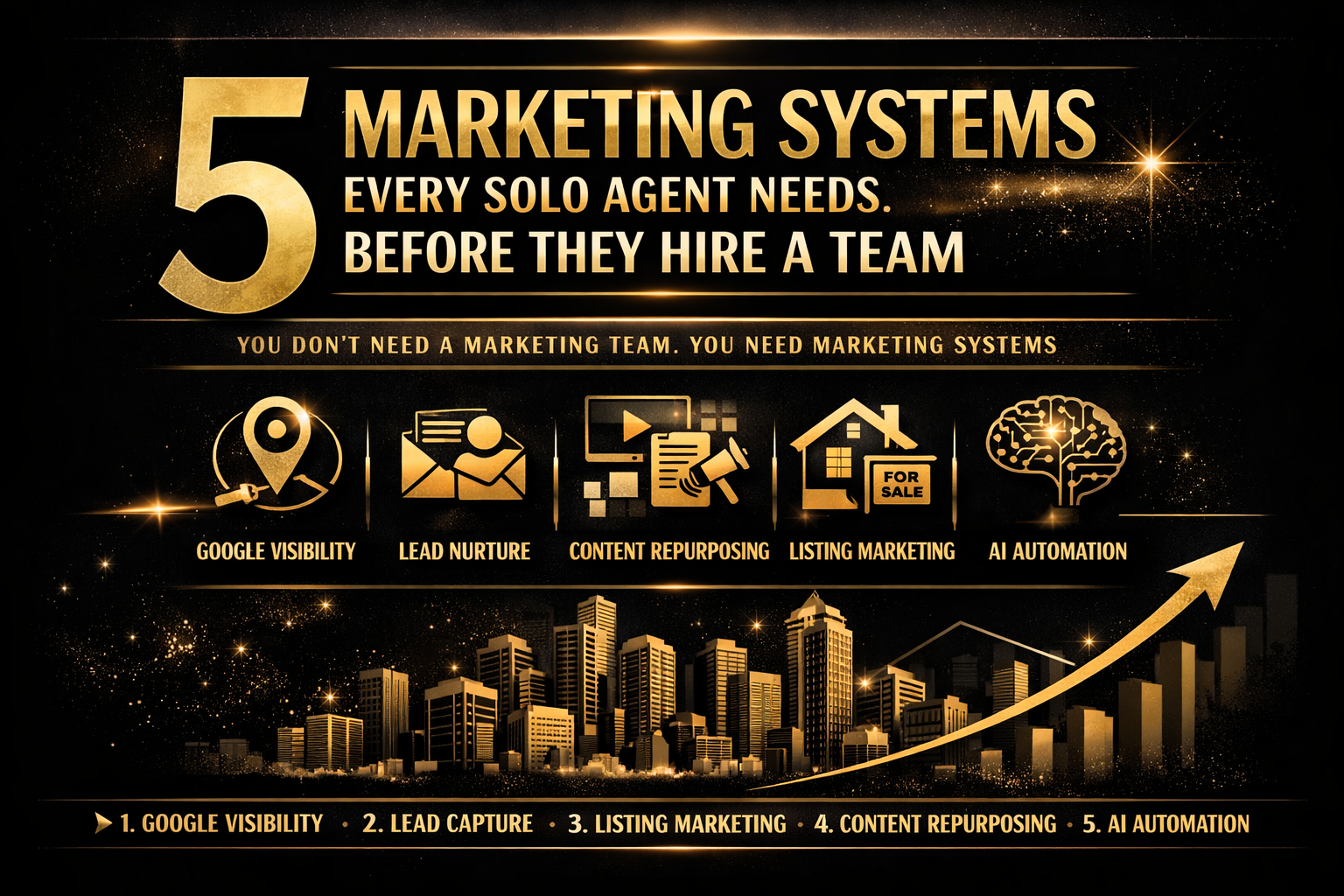
5 Marketing Systems Every Solo Agent Needs Before They Hire a Team

Five Marketing Systems every solo agent needs before they hire a team. You don’t need a marketing team, you need a marketing system.
Let me save you a very expensive mistake.

You're a solo agent doing $3M-$8M in volume. You're busy. You're closing deals. And somewhere between your 47th showing and your 12th "just checking in" text, you think: I need to hire someone to handle my marketing.

So you hire a social media manager. Or a VA. Or a "marketing assistant" who's really just your nephew's girlfriend who knows how to use Canva.

And three months later, you've spent $3,000-$6,000 and your marketing looks exactly the same — or worse, it looks like someone else's brand wearing your name tag.

Here's what nobody tells you: you don't need a team. You need systems. And until you have the right systems in place, adding people just adds chaos.

I've worked with dozens of agents across Raleigh and Lake Norman, and the pattern is always the same. The agents who scale smoothly aren't the ones who hired first — they're the ones who systematized first. Here are the five marketing systems every solo agent needs locked in before they even think about bringing on help.

System 1: Your Google Visibility System

If you don't have a system for showing up on Google, nothing else matters. Not your Instagram. Not your email list. Not your fancy new headshots.

Google is where intent lives. When someone searches "homes for sale in North Hills Raleigh" or "best listing agent Lake Norman," they're not browsing — they're buying. And if you're not in the top three results (or the Map Pack), you're invisible to the highest-intent leads in your market.

Your Google Visibility System includes three components. First, a fully optimized Google Business Profile that gets updated weekly — not set up once and forgotten. Second, a website with dedicated pages for every neighborhood and service area you work, each targeting specific local keywords. Third, a review generation process that consistently brings in fresh five-star reviews with keyword-rich content.

This system should run on autopilot once it's built. You spend 30 minutes a week posting to your GBP and responding to reviews. Your website pages work 24/7 in the background. And your review process triggers automatically after every closing.

Most agents skip this system entirely because it's not "sexy." It doesn't get likes. It doesn't go viral. But it generates more consistent, high-quality leads than any social media strategy ever will.

System 2: Your Lead Capture and Nurture System

Here's a question that makes most solo agents uncomfortable: what happens when someone visits your website?

If the answer is "nothing" — if there's no lead magnet, no email capture, no follow-up sequence — then you're paying for traffic (whether through SEO, ads, or social) and letting it walk right out the door.

Your Lead Capture and Nurture System has two parts.

The capture is a valuable piece of content that someone will trade their email for. This could be a neighborhood guide, a home seller's checklist, a market report, or a "What's My Home Worth" tool. The key is that it has to be genuinely useful — not a thinly veiled sales pitch disguised as a PDF.

The nurture is an automated email sequence that delivers value over time and positions you as the obvious choice when they're ready to buy or sell. This isn't a drip campaign that sends "just checking in!" every two weeks. It's a strategic sequence that educates, builds trust, and makes a clear case for why you're different.

A basic nurture sequence looks like this: an immediate delivery email with the resource they requested, followed by a value email two days later sharing a market insight or tip, then a story email on day five featuring a recent client success, a positioning email on day eight explaining what makes your approach different, and finally a soft CTA on day twelve inviting them to book a call or reply with questions.

Five emails. Automated. Running in the background while you're at showings. This is the system that turns website visitors into actual conversations — and most solo agents don't have it.

System 3: Your Content Repurposing System

The biggest time trap in real estate marketing is creating content from scratch every single day. You don't need to do that. You need a repurposing system.

Here's how it works: you create one core piece of content per week. That's it. One blog post, one video, or one long-form social post. Then you break it into smaller pieces that feed every other channel.

One blog post becomes a LinkedIn article (copy-paste with minor edits), three to four social media posts pulling key quotes or stats, one email newsletter highlighting the main takeaway, one Google Business Profile post with a local angle, and one short-form video script if you're doing video.

That's six to seven pieces of content from one hour of writing. Without a repurposing system, you'd spend six to seven hours creating each piece individually — and most of them would be worse because you'd be rushing.

The system part is important. This isn't about being creative in the moment. It's about having a repeatable process: write the core piece on Monday, break it down on Tuesday, schedule everything on Wednesday. Same rhythm every week. Same process. Same result.

When you eventually hire someone to help with marketing, this system is what you hand them. Without it, you're asking them to figure out your voice, your strategy, and your workflow from scratch. With it, you're handing them a machine that just needs someone to press the buttons.

System 4: Your Listing Marketing System

Every listing is a marketing event. Not just for the seller — for you.

Most agents treat listing marketing as a checklist: take photos, write a description, put it on MLS, post it on social media, done. But the agents who build their brand through listings treat every single one as a campaign.

Your Listing Marketing System should include a pre-listing package that wows the seller before you even get the contract (this is also your listing presentation differentiator), a professional photography and staging coordination process, a property-specific landing page or single-property website, a social media launch sequence (coming soon, just listed, open house, price update, under contract, just sold), an email blast to your database with the new listing, a neighborhood door-knock or direct mail piece, and a post-sale case study that you add to your website.

The key word here is "system." Every listing goes through the same process. You're not reinventing the wheel each time. You have templates, timelines, and checklists that make every listing look like a luxury launch — even if it's a $250K starter home.

This system does double duty: it impresses your sellers (which leads to referrals) and it builds your brand in the market (which leads to more listings). It's the single highest-ROI marketing system a solo agent can build.

System 5: Your AI Implementation System

This is the one that separates 2026 agents from 2020 agents.

AI isn't replacing real estate agents. But agents who use AI are replacing agents who don't. And the difference isn't about using ChatGPT to write a listing description — it's about building AI into your daily workflow so you operate at twice the speed with half the effort.

Your AI Implementation System covers four areas.

Content creation means using AI to draft blog posts, social captions, email sequences, and listing descriptions — then editing them in your voice. This cuts content creation time by 60-70%.

Client communication involves AI-powered templates for follow-ups, check-ins, and market updates that feel personal but take seconds to customize. You're not writing every email from scratch anymore.

Market research is about using AI to analyze market data, pull comparable sales, generate neighborhood insights, and create market reports in minutes instead of hours.

Lead qualification means AI chatbots or automated response systems that engage website visitors, answer common questions, and route serious inquiries to you — so you're not spending time on tire-kickers.

The agents I work with who implement even two of these four areas consistently report saving 10-20 hours per month. That's 10-20 hours you can spend on dollar-productive activities — or, you know, actually having a life.

The system part matters here too. It's not about using AI randomly when you remember. It's about building AI into your standard operating procedures so it becomes automatic. Your Monday content creation session uses AI. Your Friday follow-up batch uses AI templates. Your monthly market report is AI-assisted. Same process, every time.

The Order Matters

If you're reading this and thinking "I need all five," you're right. But don't try to build them all at once. That's how you burn out and end up with five half-built systems that don't work.

Here's the order I recommend:

Start with System 1 (Google Visibility). This is your foundation. It takes 2-3 weeks to fully build and starts generating leads almost immediately. Everything else builds on top of this.

Then build System 2 (Lead Capture and Nurture). Once you're getting traffic from Google, you need somewhere for those leads to go. This takes about a week to set up and runs on autopilot after that.

Next, add System 4 (Listing Marketing). Your next listing is your next opportunity to build this system. Create the templates and checklists once, then refine them with each listing.

Then layer in System 3 (Content Repurposing). Once you have your Google pages and your nurture sequence, you need a steady stream of content to feed them. The repurposing system makes this sustainable.

Finally, implement System 5 (AI). This is the accelerator. Once your other systems are in place, AI makes everything faster and better. But AI without systems is just faster chaos.

When You're Ready to Hire

Once all five systems are running, hiring becomes easy. You're not asking someone to "do your marketing." You're handing them documented systems with clear processes, templates, and expectations.

Your first hire should be someone who can run Systems 3 and 4 — content repurposing and listing marketing. These are the most time-intensive and the easiest to delegate because the creative decisions are already made. The hire just needs to execute the system.

Your Google Visibility and Lead Nurture systems should stay under your control (or be managed by a specialist) because they're too important to hand to a generalist.

And your AI system? That's yours. It's your competitive edge. Learn it, own it, and use it to stay two steps ahead of every other agent in your market.

The Bottom Line

You don't need a marketing team. You need marketing systems. Build the five systems outlined above, and you'll have a marketing operation that runs with minimal daily effort, generates consistent leads, and scales with your business.

Then — and only then — hire someone to help you run it.

The agents who build systems first and hire second always outperform the ones who do it the other way around. Always.

Emily Wyatt is the Founder of Real Estate Concierge Services Company LLC. She builds marketing systems for real estate agents and brokerages across Raleigh and Lake Norman — so they can stop guessing and start getting found.

Not sure which system to build first? Take the free Marketing Scorecard [blocked] to see where your biggest gaps are, or book a strategy call and we'll map it out together.

Part of The Agent Edge series:

Read More
Emily Wyatt Emily Wyatt

Best Real Estate CRMs for Solo Agents (2026 Comparison)

2026 CRM Comparison Guide for Realtors

Let’s be honest: as a solo real estate agent, your CRM isn’t just a digital address book. It’s your business partner, your second brain, and the only thing standing between you and a pipeline full of missed opportunities. But the market is flooded with options, most of them built for massive teams with budgets to match.

So, which CRM is actually the right fit for a solo agent in 2026? It’s not the one with the most features. It’s the one you’ll actually use.

After reviewing dozens of platforms and talking to agents on the ground, I’ve narrowed it down to the only options that matter for solo agents. Here’s the no-fluff breakdown.

The Only 4 CRMs You Should Be Considering

Forget the endless lists. For 99% of solo agents, the right choice is one of these four, each for a very different reason. Make it stand out. Whatever it is, the way you tell your story online can make all the difference.

CRM Comparison Guide by Price

Top 4 CRM’s for Real Estate Agents - Starting Price + The Bottom Line

1. Follow Up Boss: The Best Overall for Solo Agents

You should choose Follow Up Boss if: Your business relies on converting inbound leads from multiple sources (Zillow, your website, social media) and you know that speed-to-lead is everything.

Follow Up Boss is the undisputed king of lead management and disciplined follow-up. It’s less of a CRM and more of a command center. It pulls in leads from over 250 sources, tells you exactly who to call next with its Smart Lists, and keeps every text, call, and email in a clean, chronological timeline for each contact.

It’s not the cheapest, and it doesn’t come with a website. But if you’re serious about turning your leads into closings, the investment pays for itself. The “Grow” plan is the perfect starting point for a solo agent.

  • Pro: Unbeatable lead aggregation and speed-to-lead tools.

  • Con: The built-in dialer is an extra $39/month on the solo plan.

  • Bottom Line: If you’re paying for leads, you can’t afford not to have a system this tight.

2. Wise Agent: The Best for Relationship-Based Businesses

You should choose Wise Agent if: Your business is built on your sphere of influence (SOI), past clients, and referrals. You need a system that helps you nurture relationships, not just chase new leads.

Wise Agent gets that for many agents, the money is in the long-term relationship, not the instant conversion. It’s packed with marketing tools designed for nurturing: monthly newsletters, landing pages, and robust transaction management checklists. It’s an all-in-one platform that feels like it was actually built by agents.

It may not feel as sleek or aggressive as Follow Up Boss for rapid-fire lead response, but its strength is in its consistency. It’s the steady, reliable engine for the agent who wins on trust, not just speed.

  • Pro: Excellent marketing and transaction management tools included at a great price.

  • Con: The interface can feel a bit dated compared to newer platforms.

  • Bottom Line: If your motto is “relationships over transactions,” Wise Agent speaks your language.

3. LionDesk: The Best Value for Communication Power

You should choose LionDesk if: You want to leverage text and video in your follow-up but don’t want to pay a premium for it. You value personal communication and need a tool that makes it easy and affordable.

LionDesk’s core strength is its communication suite. It was one of the first CRMs to integrate video messaging directly into its platform, and its bulk texting and drip campaigns are powerful for the price. It’s a workhorse CRM that gives you the tools to connect with your database in a more personal way.

It’s not as polished as the top-tier players, and its analytics are basic. But for a solo agent who wants to stand out by being more human in their follow-up, LionDesk offers incredible value.

  • Pro: Includes video email, bulk texting, and AI-powered lead follow-up at a very competitive price.

  • Con: The user experience isn’t as intuitive as Follow Up Boss or Wise Agent.

  • Bottom Line: The best bang-for-your-buck if your strategy is built on personal outreach.

4. HubSpot: The Best Free Starting Point

You should choose HubSpot if: Your budget is zero and you need to get your contacts out of a spreadsheet and into a real system today.

Let’s be clear: HubSpot is not a real estate CRM. But its free version is a powerful, clean, and reliable platform for basic contact and deal management. You can create a pipeline, track your deals, and log your activities. It’s a massive step up from having no system at all.

The downside is that you’ll spend time customizing it to make sense for real estate. You’ll have to manually create properties for “Listings” and “Closings,” and you won’t get any of the industry-specific automations that make paid CRMs so valuable. But as a starting line, it’s unbeatable.

  • Pro: It’s free, it’s easy to use, and it provides the fundamental structure every agent needs.

  • Con: Requires significant customization and lacks real estate-specific features.

  • Bottom Line: A smart, professional choice when you’re just starting out and need to build good habits without the monthly fee.

The Final Verdict

Your CRM is the engine of your business. Choosing the right one isn’t about finding the “best” one—it’s about finding the one that matches your business model, your budget, and your personality.

  • For the conversion-focused agent: Choose Follow Up Boss.

  • For the relationship-focused agent: Choose Wise Agent.

  • For the budget-conscious communicator: Choose LionDesk.

  • For the agent starting from scratch: Start with HubSpot.

Need help getting your CRM set up, your database cleaned, and your follow-up automated? That’s exactly what I do. Book a free consultation and let’s build a system that actually works for you.

Frequently Asked Questions

What is the best CRM for a solo real estate agent?

It depends on how you run your business. If you're converting inbound leads from Zillow, your website, or social media, Follow Up Boss is the strongest option for speed-to-lead and pipeline discipline. If your business runs on referrals and sphere of influence, Wise Agent is built for that relationship-first approach. There's no single "best" — there's the best fit for how you actually work.

How much should a solo agent spend on a CRM?

Most solo agents should budget between $25 and $75 per month. Wise Agent and LionDesk both come in around $40-$49/month and cover the essentials. Follow Up Boss starts at $58/month and is worth it if you're actively spending on lead generation. If your budget is truly zero, HubSpot's free tier gets you out of the spreadsheet and into a real system today.

Do I really need a CRM if I only close 10-15 deals a year?

Yes — arguably more than a high-volume agent. When every deal matters, you can't afford to let a lead slip through the cracks because you forgot to follow up. A CRM isn't about volume. It's about consistency. The agents closing 10-15 deals who use a CRM are the ones who grow to 20-25 without burning out.

Can I use HubSpot as a real estate CRM?

You can, but you'll need to customize it. HubSpot's free tier gives you contact management, deal pipelines, and activity logging — but none of it is real estate-specific out of the box. You'll manually create custom properties for things like listing addresses, closing dates, and transaction types. It works as a starting point, but most agents outgrow it within 6-12 months and move to a purpose-built platform.

What's the difference between a real estate CRM and a general CRM?

Real estate CRMs come pre-built with industry workflows: transaction management checklists, MLS integrations, drip campaigns timed to the buying cycle, and lead routing from sources like Zillow and Realtor.com. General CRMs like HubSpot or Salesforce require you to build all of that from scratch. For a solo agent, the time savings alone make a real estate-specific CRM worth the investment.

Should I pick a CRM based on features or price?

Neither — pick it based on fit. The most expensive CRM is the one you stop using after 60 days because it doesn't match how you work. If you're a relationship-driven agent, a lead-conversion machine like Follow Up Boss will feel overwhelming. If you're running paid ads and need speed, a nurture-focused tool like Wise Agent will feel too slow. Match the tool to your workflow first, then compare price within that category.

How long does it take to set up a real estate CRM?

Most solo agents can get up and running in 2-4 hours. That includes importing your contacts, setting up your pipeline stages, and creating your first drip campaign or follow-up sequence. Wise Agent and Follow Up Boss both offer onboarding support. The real investment isn't setup — it's the first 30 days of building the habit of actually using it every day.

Can I switch CRMs without losing my contacts?

Yes. Every CRM on this list supports CSV export and import, so your contact data is portable. The things you'll lose are your automation sequences, email templates, and activity history — which is why it's worth choosing carefully upfront. If you're switching, export everything, clean your data, and treat it as a fresh start rather than a copy-paste migration.

Read More